

 11 Jun 2026
 21 min read
![[header] hyperpersonalization in mobile (6) (1)](https://www.miquido.com/wp-content/uploads/2026/06/header-hyperpersonalization-in-mobile-6-1.jpg.webp)
Did you know that AI-driven UI adaptation can reduce user churn by up to 30% in digital sectors? App providers have a massive financial incentive to keep evolving these systems. Real-time adaptations can significantly improve key engagement metrics – including time-on-platform, click-through rates, and user satisfaction – proving the business case for fluid experiences.
Yet, as artificial intelligence (AI), Generative UI, and edge-cloud computing make real-time structural mutation technically effortless, product designers find themselves facing a delicate UX paradox. When an interface becomes a hyper-dynamic fluid shape, it risks colliding with the most fundamental laws of human psychology.
Hyperpersonalization efforts in apps fail not because of poor personalization intent, but because the apps' algorithms create friction in the mobile experience. When UI layouts shift unexpectedly, users feel a loss of agency and quickly abandon the platform. But what does this mean in practice?
The theoretical engine: What powers hyperpersonalization in mobile?
To design an effective adaptive interface, we must first understand the technical components that transition an app from a rigid, code-compiled monolith into an intelligent ecosystem.

Modern hyperpersonalization relies on an interconnected loop of three core pillars:
- Contextual data telemetry: Real-time data capture including precise location, local time, weather, device state (battery level, network speed), and behavioral micro-signals (scrolling velocity, tap hesitation).
- Predictive intent models: Machine learning models operating on the device and in the cloud to translate raw telemetry into probabilistic intent. Instead of asking "What did users in this demographic buy?" the system asks, "What is this specific user trying to accomplish in the next seven seconds?"
- Generative UI and cloud scaffolding: Powered by multimodal large language models (LLMs) and server-driven UI architectures, the layout is rendered on the fly. Rather than displaying pre-cached screens, the app dynamically constructs structural elements tailored entirely to the immediate use case.
The friction point: Probability vs. predictability
We asked product design leads to share their thoughts on where the line gets crossed. It turns out the problem runs deeper than simple visual preference: the "thin line" where hyperpersonalization turns into cognitive chaos is the friction point between predictability and adaptability.
Traditional UX design assumes predictability, wrapped up in Jakob’s Law: users expect your app to work the same way as all the others. AI, by its very nature, operates on probabilities. When these two concepts clash, designers express anxiety over "UX without control," and the interface rapidly encounters three major hurdles:
Breaking muscle memory
The human brain builds spatial maps of digital products. If an AI model dynamically moves a core navigation bar, a primary call-to-action, or a checkout button based on "predicted real-time intent," it violates the user's spatial memory. A user should never have to look for a basic functional button they used five minutes ago.
The "ghost in the machine" effect
When an interface shifts layouts aggressively without a user-initiated context (like a swipe or tap), it creates an uncanny feeling. The user feels a loss of agency, as if the app is moving on its own. If a user feels they are chasing an algorithm rather than directing a tool, the interface fails.
High cognitive load
If a user opens an app and has to relearn the visual hierarchy every single time, the mental effort required to use the app outweighs the benefits of personalization. An empirical study on app-switching behavior explicitly identifies 'cognitive switching costs' — users' perceptions of the time, effort, and expense required to learn and adapt to new interfaces — as a primary barrier to platform migration, validating that interface familiarity directly suppresses churn.
Cultural variance of personalization in mobile and the super app exception
The psychological threshold for hyperpersonalization is not universal; it is heavily mediated by geography and regional digital evolution. Users look for different elements in apps depending on their region.
The Western paradigm: Fragmented curation
In Western markets, users grew up in a fragmented app ecosystem governed by strict individual boundaries. Personalization is expected to be invisible, localized within content feeds rather than altering the structural shell of the application. Aggressive data cross-pollination often triggers immediate privacy alarms and user distrust, especially with tightening regulations regarding AI data pipelines. On top of that, many industries like banking or health are subjects to strict EU AI Act norms that determine how data can be processed and used within the application, also for the personalization purposes.
However, things are slowly changing. Although the shift comes at slow pace, we have seen the rise of super apps in Europe in the recent years. Statistics prove their consequent growth, with fintech super apps leading this transition. Nevertheless, the European user is more sensitive to hyperpersonalized interface and app architecture, so a thorough UX research is essential if you plan advanced innovations in this field.

The Asian paradigm: The normalization of the super app
In contrast, users across Asian markets have been used to deeply integrated Super Apps (like WeChat, Grab, or Gojek) since years. These ecosystems function as digital identities, weaving together ride-hailing, micro-remittances, social networking, and food delivery.
Because users natively understand that these platforms require vast, interconnected data pipelines to function, extensive data usage for hyperpersonalization purposes doesn't shock that much or cause doubt. A Super App can seamlessly morph from a slick, high-efficiency corporate commuting dashboard for an enterprise power user into a lightweight, peer-to-peer fintech interface for another, without triggering a crisis of trust.
Real-world paradigms: High-fidelity personalization in mobile apps
Many mainstream and specialized applications use advanced models to dynamically alter the user experience. To see how major platforms scale personalization without breaking the user's underlying mental model, consider the following structural approaches:
| Platform | Hyperpersonalized elements | Technical execution | UX safeguard |
| Spotify | Home Grid, AI DJ Companion | Combines contextual history, temporal data, and audio text-to-speech synthesis. | Keeps the core navigation structure strictly static; personalization occurs entirely within content blocks. |
| Netflix | Thumbnail Artwork, Row Hierarchy | Performs localized multi-armed bandit testing. If a user favors romance, thumbnails emphasize romantic leads; if action, they show stunts. | The underlying content grid remains entirely predictable, preserving the exploration layout. |
| Amazon | Layout Hierarchy, Dynamic Banners | Generates dynamic home screen widget ordering based on buyer velocity and intent signals. | Keeps primary search, utility bars, and cart locations permanently locked in place. |
| Duolingo | Lesson UI Layout & Complexity Scaffolding | Adjusts internal lesson difficulty via AI. Novices receive simple visual matchmaking; power users receive complex text inputs. | The overarching sequence, progression map, and gamified reward systems remain identical. |
The zero UI paradox: What it means for hyperpersonalized interfaces?
Product designers might also be worried about the Zero UI possibility – a future where user needs are resolved via voice, ambient text, or background API calls, rendering the traditional styled app interface obsolete. How does this juxtapose with the hyperpersonalization trend?

Rather than competing, hyperpersonalization and Zero UI represent two sides of the same evolutionary coin:
- The Zero UI approach completely eliminates the visual canvas for routine, highly predictable tasks. The app becomes a headless engine feeding data to a system-level agent (like Apple Intelligence or Google Gemini overlaying the OS).
- The Generative UI approach steps in when high cognitive overhead or deep exploration is required. The layout is generated on-the-fly powered by large multimodal models to fit immediate intent (e.g., dynamically generating a specialized comparison table widget only when a user asks the app to compare two products).
This juxtaposition reveals that true "stickiness" doesn't come from an app dynamically changing its face every five seconds. Instead, everyday users are demonstrating a completely different, highly practical trend: the rise of the disposable, single-user personalized app. True stickiness comes from an app being built precisely around a user's unique lifestyle constraints from day one, leveraging AI to build custom, static, hyper-niche software frameworks.
Business benefits: How providers weaponize personalization
Catering to user expectations is only the baseline. App providers use hyperpersonalization to heavily manipulate business metrics and conversion rates in their favor:
- Micro-moment monetization: By altering the layout based on real-time triggers, apps can surface hyper-targeted, high-converting calls to action (CTAs) at the exact millisecond the user is most likely to buy.
- Maximum platform lock-in: When an interface adapts perfectly to an individual's unique workflow, habits, and eccentricities, the switching cost becomes incredibly high. Leaving that app means the user has to go to a competitor and "train" a new interface from scratch.
- Asymmetrical A/B testing at scale: Instead of deploying static A/B tests to millions of users, AI adaptive interfaces continuously run micro-experiments on layout, color psychology, and placement per individual.
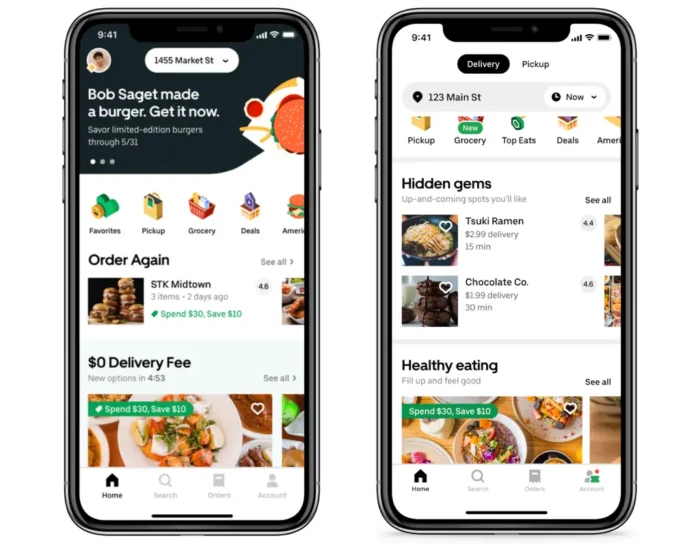
Personalizing with the good old push notifications and other microtexts still does its job, too; while users might ignore it often, flooded by communicates from various apps, personalized ones are much more effective once they get through. A 2025 meta-analysis found personalized CTAs yield approximately 42% higher conversion versus generic CTAs, while full-page contextual popups reached ~13.6% conversion; reactive personalization based on real-time behavior is now identified as a leading CRO technique, complementing pre-segmented approaches across full user journeys.

The personalization illusion: Why companies are holding back
Despite the general enthusiasm and , critical voices often point out the current state of mainstream apps, noting that what companies call "hyper-personalization" is usually just lazy segmentation. Several major roadblocks explain why truly adaptive UIs haven't taken over the market yet:
- The fragmented data gap: True personalization requires cross-pollinating incredibly sensitive, siloed data (e.g., matching genetic health data with daily fitness metrics). Right now, none of these data pipelines talk to each other.
- Development cost vs. value: Building an interface that safely adapts in real time without breaking established workflows is an engineering nightmare. For most companies, the massive development and QA costs simply do not justify the risk of alienating users who just want a predictable interface.
The hyperpersonalization decalog: A UX manifesto
To keep hyperpersonalization effective, invisible, and user-centric, mobile UX designers must find a happy medium. You can use these ten design guidelines to ensure your system guides algorithms effectively without causing user frustration.
1. Respect Jakob’s Law
Users spend most of their time on other applications. Keep your global architecture, universal gestures, and behavioral patterns consistent with industry standards. Innovation should happen within contextual content, not common mechanics.
2. Lock the structural mental model
An interface can dynamically change its content, shortcuts, and complexity scaffolding, but it must never dynamically change its structural mental model. Core navigation layouts, universal back buttons, or primary utilities must remain static to prevent user disorientation.

3. Personalize via progressive disclosure
Instead of burdening users with options at the very beginning, show them value progressively. Use AI to gracefully hide advanced features for novices to avoid initial overwhelm, while exposing them as streamlined shortcuts for power users over time.
According to Nielsen Norman Group, progressive disclosure directly improves three of usability's five core components — learnability, efficiency of use, and error rate — by helping novice users avoid mistakes while saving power users time by eliminating the need to scan irrelevant features. Research confirms users build better mental models of a system when features are prioritized progressively rather than exposed all at once.
4. Prioritize thumb-zone optimization
When dynamically arranging personalized components, ensure the highest-converting, most frequently used elements remain optimized within the natural physical reach of the user's thumb.
Research cited by NNG (Nielsen Norman Group) shows thumb-zone optimization alone increases mobile engagement by 28%, and landing pages with fewer than 10 UI elements achieve approximately 2x higher conversion rates. That’s an empirical proof that reducing interface complexity directly drives measurable revenue outcomes.
5. Maintain interface simplicity
Do not allow personalized widgets to clutter the visual field. Prioritize clean spaces. Landing pages with fewer than 10 UI elements achieve approximately 2x higher conversion rates – keeping the interface tidy helps users focus on the crucial actions.

6. Animate structural shifts natively
If a personalized layout modification must occur while the user is active, never allow components to abruptly "pop" or flash into place. Use smooth, continuous spatial transitions – like an icon gently sliding into place rather than popping up instantly – to maintain visual continuity.
7. Value user action over inferred intent
Direct behavioral actions (a deliberate tap, search query, or filter choice) must always take absolute precedence over background algorithmic assumptions. Never let an inference override explicit user input.
8. Ensure deterministic system transparency
Avoid the "gaslighting effect." Users should not notice layout manipulation, but they must have transparency regarding data manipulation. Users should never feel like an interface is hiding core functions. Provide clear contextual clues indicating why the view has updated.
9. Anchor the experience with static fallbacks
If network connectivity drops or an AI model returns low-confidence predictive arrays, the interface must instantly resolve to a flawless, highly performant static baseline layout. A broken model should never mean a broken app.
10. Design for human agency
76% experience frustration when personalization is missing, according to Miquido's Mission Self Possible report; but, at the same time, agency is something they value more and more. The ultimate goal of hyperpersonalization is to empower the user, not to box them into an algorithmic echo chamber. If a user feels they are chasing an algorithm rather than directing a tool, the interface fails. Always provide an easily accessible manual escape hatch – ensuring the user retains ultimate control.
How could it look like?
- A micro-slider on hover/tap: "Why am I seeing this? [Dial it down]"
- A visible tag cloud showing the top 5 keywords driving the current feed
- A "Incognito Tool Mode" switch that pauses all data collection for the next hour so the user can explore freely without ruining their baseline profile.

Personalization in mobile: The invisible vs. the intentional
Integrating these insights shows us that hyperpersonalization is splitting into two distinct paths:
- The invisible consumer layer: Mainstream apps will likely cap their visual adaptivity at subtle content curation and predictive shortcuts to avoid triggering the "blurry control" effect that frustrates users.
- The intentional creator layer: The ultimate form of personalization won't be an app that changes shapes while you look at it. It will be an AI that allows you to instantly generate or modify the interface to perfectly match your intent, giving you total control over the tool.
The hallmark of world-class product design remains unchanged: Users should notice the immense convenience of the application, never the underlying machine processing it.
You need help understanding them better? Our UX audit will help you choose the best personalization strategy.

Top AI innovations delivered monthly!
The administrator of your personal data is Miquido sp. z o.o. sp.k., with its ... registered office in Kraków at Zabłocie 43A, 30 - 701. We process the provided information in order to send you a newsletter. The basis for processing of your data is your consent and Miquido’s legitimate interest.You may withdraw your consent at any time by contacting us at marketing@miquido.com. You have the right to object, the right to access your data, the right to request rectification, deletion or restriction of data processing. For detailed information on the processing of your personal data, please see Privacy Policy.

![[header] now next later roadmap how to plan an early stage product](https://www.miquido.com/wp-content/uploads/2026/10/header-now-next-later-roadmap_-how-to-plan-an-early-stage-product-2048x1365.jpg.webp)


![[header] top 6 mobile app development companies in poland (6) (1)](https://www.miquido.com/wp-content/uploads/2026/10/header-top-6-mobile-app-development-companies-in-poland-6-1-2048x1365.jpg.webp)

![[header] on device ai vs. cloud overhead controlling the unit economics of mobile intelligence](https://www.miquido.com/wp-content/uploads/2026/09/header-on-device-ai-vs.-cloud-overhead-controlling-the-unit-economics-of-mobile-intelligence-2048x1365.jpg.webp)
